Platform

The engine runs the work. The modules keep the record.

AnyWork is a process engine with modules around it. Your processes run in the engine. The modules hold the people, vehicles, files and sites those processes use. Our team sets it up with you.

AI Solutions
Modular ERP
Documents
Attendance
Process engine
Mobile tracking
IoT
Base stations
Time tracker

How it fits

Follow one request through AnyWork.

A driver returns a drill at the end of a shift. Here is what each part of AnyWork does with it.

  1. 1Person

    The driver hands it back

    At the end of the shift the driver scans the drill, notes a cracked handle, adds a photo and signs on the phone.

    Tool handover T-0412ConditionCracked handlephoto-1.jpgSigned
  2. 2Process engine

    The rules decide what happens

    Damage was reported, so the store manager approves the return and a repair task opens with a 24 hour deadline.

    RuleIf damage is reportedStore manager approvesRepair task opens, due in 24 h
  3. 3Modules

    The data lands where it belongs

    The tool goes back into stock, the photo is filed, and the handover shows up on the driver and the van.

    InventoryT-0412 back in storeDocumentsPhoto filedHROn the driverFleetOn Van 12
  4. 4One record

    Everything stays on one history

    Who, when, the photo, the signature, the approval and the repair task. Anyone with access finds it in seconds.

    17:42Returned by driver17:43Photo added17:51Approved by store manager17:51Repair task TK-2304
  5. 5Your systems

    The rest of the company sees it too

    AnyWork reads and writes into the systems you already run, so the stock count and the repair cost are not typed again.

    Your ERPStock count updatedFinanceRepair cost booked

Modules

One engine. The modules around it.

Each module does one job. Your processes use them, so the work and the record stay together. Start with what you need and add more later.

Process engine

Your process, step by step, with nobody chasing it.

Every process is a workflow and its pages. Our team draws the workflow in FlowCraft and builds the forms in FlexiPage. From then on the engine sends each step to the right person, watches the deadline and moves the case on. When your rules change, we change the flow.

FlowCraft: the tool handover request, from request to ERP update.

FlexiPage: the request form, with the Condition field selected and its properties on the right.

Process Monitor: every running case, its status and its owner.

  • Workflows in FlowCraftSteps, decisions, timers and routing, drawn as one flow.
  • Pages in FlexiPageThe form for each step, with conditions, security and layouts for desktop, tablet and phone.
  • Safe versionsA new version applies to new cases. Cases already running finish on the rules they started with.
AnyWork AI

Ask in plain language. The work happens in AnyWork.

The AnyWork Assistant takes a request in plain language, asks for what is missing and carries it out in AnyWork, within the user's permissions and the rules of the process. Invoices are read straight into the form, and Code Generator turns a business question into code. People check the result before anything moves on.

AI Assistant
Expense Claim AI: receipt review

Screens from the AnyWork mobile app: the AI Assistant and a receipt read by Expense Claim AI. Sample data.

  • AnyWork AssistantCreate workflows and users, find and summarize documents, and see where work stands.
  • Invoice to formUpload a photo or PDF. Vendor, date, VAT and total fill the form, and you check them before you submit.
  • Code GeneratorA question in English or Turkish becomes code to review, such as a SQL Server query.
  • DOkumaIn developmentFind documents by what they say, across PDFs, images and Office files, instead of by file name.

Used in

Expense claimPurchase request
ERP modules

The records your processes work on, in the same system.

HR, finance, fleet and inventory each keep their own records. A leave request reads the balance from HR, a handover updates the vehicle, a purchase lands in finance. Nobody exports a file or types the same thing twice.

Fleets / Vehicles, with the ERP menu open: HR, finance, products, fleets and more.

HR / Employee: every person with project, title and status.

  • HR and payrollPeople, contracts, payroll and probation, kept with the project they work on.
  • Fleet and inventoryVehicles, tools and stock with their drivers, locations and history.
  • Written by the processEach step updates the record as it closes, so the data is current.

Used in

Leave requestBusiness advanceVehicle handover
Document management

Files stay with the work they belong to.

A photo from a handover, a signed contract, a survey report: each one is filed with its case, its person or its site. Access is set per category and per document, so people only see what they are allowed to.

Document Management: recent files on top, folders below.

Inside a folder: files with their tags, size and date.

  • Filed with the caseFiles from a process are kept with the case, the person or the site.
  • Access per categoryDecide who sees each category, and each document inside it.
  • Tags, favorites, recentTag files, keep favorites close and pick up recent files.

Used in

Attendance

Who works when, and who is off.

Set the work hours and break rules once, with exceptions for teams that work different shifts. Check-ins come from the phone or from fingerprint readers and similar devices at the door. Leave requests go through approval and the balance updates on its own.

Attendance Devices: fingerprint readers and similar devices, with the people matched to each.

My ERP / Time Sheet: check-in, check-out and duration for each day.

My ERP / Leaves: leave requests and their status.

  • Fingerprint and other devicesConnect fingerprint readers such as ZKTeco iClock; each check-in lands on the person's time sheet.
  • Shifts and breaksWork hours, break limits and exceptions for each team.
  • Leave with approvalRequests go to the manager; the balance updates when approved.

Used in

Leave requestOvertime approval
Mobile tracking

Know where every crew and vehicle is.

Phones and vehicle trackers report their position. Dispatchers see everyone on one map and give the next task to whoever is closest. Each tracker is tied to a plate and a driver, so a position always has a name.

Mobile Tracking: crews and vehicles on the map.

Fleets / Vehicle Tracking: each tracker with its plate, driver and last update.

  • Live mapCrews and vehicles on one map, updated as they move.
  • Closest crew firstHand out the next task by location.
  • Tied to the recordEvery tracker belongs to a vehicle and a driver in Fleet.
IoT

A sensor reads it, a workflow starts.

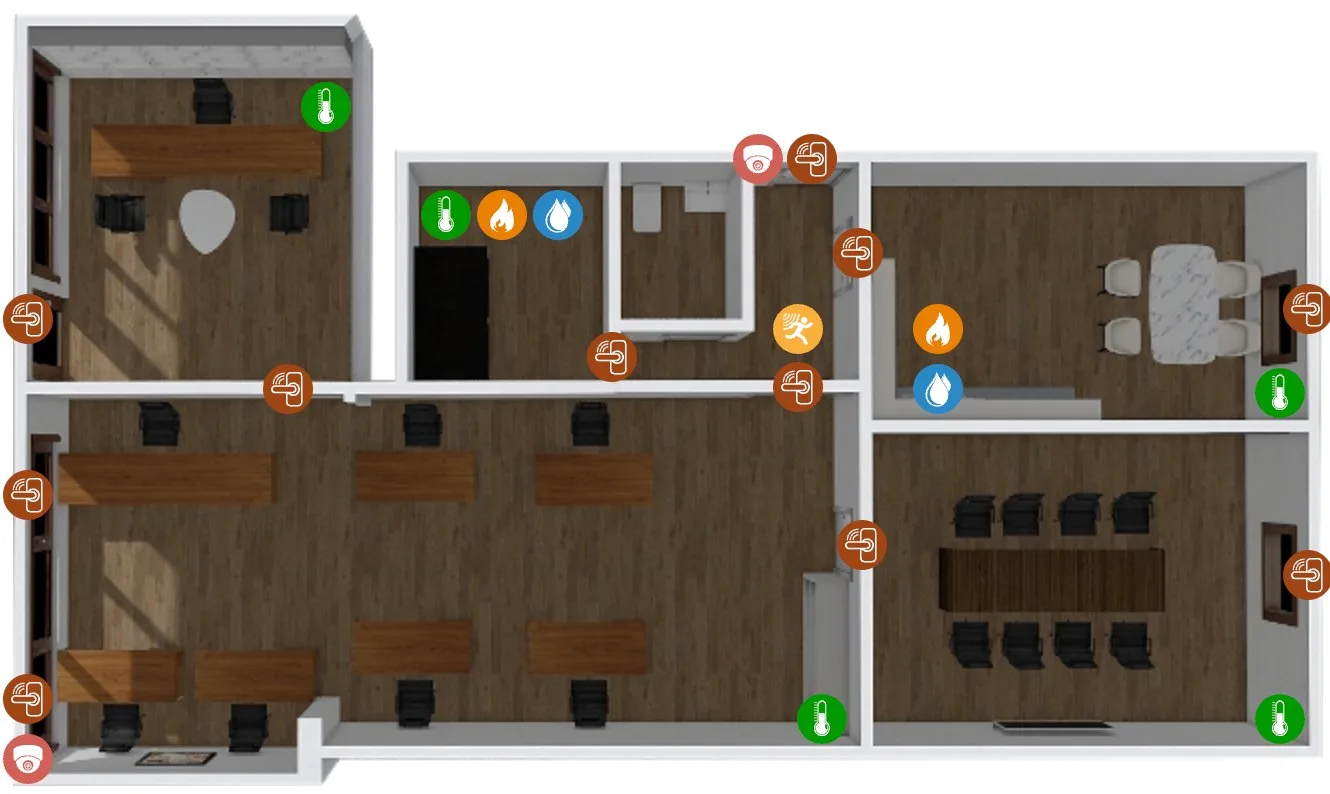
Door, temperature, gas, water and motion sensors sit on the floor plan where they are installed, and every reading lands in the log. A sensor can start a workflow during the hours and days you choose, and the task is followed in the Process Monitor like any other case.

IoT: the office floor plan with every sensor where it is installed, and the sensor log below.

Process Monitor, filtered: the cooling checks the temperature sensor opened.

  • Sensors on the floor planDoor, temperature, gas, water and motion sensors and cameras, shown where they are installed. Gateways such as Xiaomi are supported.
  • A reading starts a workflowSet the hours and working days a sensor is watched, and the workflow it starts.
  • Followed like any caseThe task runs in the engine, with its owner and deadline.
Base stations

Every site, with everything that happened to it.

Each base station has one record: technology, bands, equipment, alarms and visits. Find a site on the map or in the list. Open actions link to the processes that close them, from a cooling check to a final survey.

Base Stations: every site on the map.

RF / Sites: technology, band, type and status for each site.

  • Map and listFind a site on the map or filter the site list.
  • One record per siteTechnology, bands, equipment and status together.
  • History and actionsVisits, alarms and open actions linked to their processes.

Screens from the AnyWork app, with sample data.

Deployment

Three ways to put AnyWork in.

You do not have to replace anything to start. Most teams begin with the first and move inward over time. Cloud or on-premise.

On top

AnyWork sits above the systems you already run and reads and writes into them. Nothing is retired.

Fastest start. Lowest risk.

In line

AnyWork takes one step of the chain end to end and owns the data for that step.

When one process is the bottleneck.

Full stack

A modular ERP with the process engine on top. Records, work and reports in one system.

When you are replacing a legacy core.

People and IT

Built for your people and your IT.

Your teams work from the phone or the desk. Your IT team decides where it runs and who gets in.

For your people

On the phone

Android and iOS apps: tasks, timeline, documents, notes and notifications.

Timesheets from the phone

Hours are entered in the mobile app by work type and sub-type, with a short note.

Approve from email

Approve a step or move it on straight from the email.

Notifications

By email, in the app and as push notifications, set per step.

Four languages

English, German, Turkish and Arabic.

For your IT team

Your servers or ours

Run it in our cloud or on your own servers, including Red Hat OpenShift.

Sign-in

Single sign-on with LDAP or Active Directory, and optional two-step login with Google Authenticator.

Roles and permissions

Access is granted by role. Documents are permissioned per category and per file.

Works with the tools you already use

AnyWork connects to these systems today. If yours is not here, ask us.

  • Active Directory/LDAP
  • Google Authenticator
  • Nextcloud
  • Google Drive
  • Dropbox
  • Yandex Disk
  • Google Cloud
  • Power BI Report Server
  • SSRS
  • Tableau
  • QuickBooks
  • Google Maps
  • OpenStreetMap
  • ZKTecoiClock
  • Xiaomi Gateway
  • Firebase Cloud Messaging
  • Azure DevOps

Name your next process.

Bring the one that costs your team the most time. We map it with you, tell you what it takes, and show it running in the demo.

You talk to the people who will build your process, from the first call on.