
AnyWork AI Solutions
Put your company knowledge to work.
Find documents by what they say, turn questions into code, run AnyWork processes in plain language and move invoice details into workflow forms. AnyWork's AI solutions make information easier to reach and repetitive work lighter.
For teams who search documents, prepare queries, run processes and enter invoices every day.
Four solutions
AI built into the work you already do.
Each one does a different job. Pick the one that fits your team, or use them together inside AnyWork.
 DOkuma
Type what you need, not the file name.
Find company documents by their content. DOkuma reads, classifies and prepares documents for plain-language search.
Explore DOkuma Code Generator
Describe what you need, get code to review.
Ask in English or Turkish. Code Generator matches your question to the right tables, relations and business states and writes the code. You review it; running it is your call.
Explore Code Generator AnyWork Assistant
Say what you want done. The Assistant does it.
Create workflows and users, work with documents and run your AnyWork processes in plain language, within your permissions.
Explore the Assistant Smart invoice processing
Upload the invoice, the form fills in.
Pull the details from an invoice photo or PDF into the workflow form you already use. Check the fields, fix what needs fixing and move on.
Explore invoice processing
DOkuma
Reach the right document without knowing its name.
A file being in the archive doesn't mean anyone can find it. DOkuma reads PDFs, images and Office files and makes them searchable in plain language. Describe what you're looking for and see the matching documents in one list.
For operations and back-office teams, management and audit, new colleagues who don't know the folder paths yet, and IT teams growing their AnyWork document setup.
- Employment contract
- Vehicle registration
- Invoices from the last 3 months
- Fuel invoice, Station A, March 2024Invoice14.03.2024
Diesel for fleet vehicles, Istanbul region. Total and VAT on page 1.
- Fuel invoice, Station B, June 2024Invoice02.06.2024
Fuel and car wash for two service vans, Istanbul.
- Fleet fuel summary, Q3 2024Report08.10.2024
Quarterly fuel spend per vehicle, Istanbul and Ankara.

Every common format
Prepare PDF, JPG and PNG, Word, Excel and text files in one processing flow.

Search by content
Search that combines meaning and keywords finds documents by topic and by details such as a date or a number.

Organized information
Documents get a title, description, date, category and key details, a tidy base for filtering and reporting.

A quality-checked archive
Documents that are hard to read or can't be analyzed reliably are set aside for review, so search stays clean.
 CollectFiles in the document pool are scanned and registered.
 UnderstandText and images are processed; summaries and passages are prepared for search.
 EnrichTitle, description, date, category and key details are filled in.
 SearchYou describe what you need in plain language; the matching documents come back ranked.
In development. DOkuma is in active development. Document processing, quality checks and search are being refined with pilot users.
Code Generator
Write your question. Get the code.
In a database with hundreds of tables, picking the right tables, columns, relations and status codes takes expertise. Code Generator picks the context that fits your question and writes the code with a short explanation. You check it, copy it and decide what runs.
For data analysts, operations and reporting teams and the technical teams who prepare queries. It takes the legwork out of schema research; it doesn't replace checking the result.
SELECT u.FullName, n.UnitNameFROM Users uJOIN Units n ON n.UnitId = u.UnitIdWHERE u.Status = 1 -- Active AND n.UnitId = @UnitIdORDER BY u.FullName;
A short explanation of what the code does and which tables it uses.

Plain language to code
Turn business questions in English or Turkish into code, such as a SQL Server query.

The right tables
Related tables are picked so the code is built on the right data structures.

Relations included
Linked tables are joined when the question needs them.

Business states understood
Words like "active" or "retired" are matched to the right status codes.

Explains the data
Ask "what is this record type for?" and get a plain answer instead of code.

Follow-up questions
Keep going on the same topic; the conversation keeps its context.
 AskDescribe what you need in English or Turkish.
- UnderstandIt works out whether you need code or an explanation of the data.
 SelectTables, business states and related structures are picked.
 WriteThe code is written from the selected schema details.
 ReviewCheck the code and its explanation, then copy it.
You stay in control. Code Generator works from a prepared schema and descriptions. The code is shown for you to review; whether it runs is up to you.
AnyWork Assistant
Say what you want done. The Assistant does it.
Getting work done usually means switching modules, finding records, filling forms and following steps. The AnyWork Assistant understands what you want to do, collects what's missing and carries it out in AnyWork, within your permissions and the rules of the process.
- Create a new purchase workflow.
- Create a user for the operations team; let's fill in the details together.
- Find the documents for this request and summarize them.
- Show me where my workflow stands.
- List the delayed processes and bring up the details.
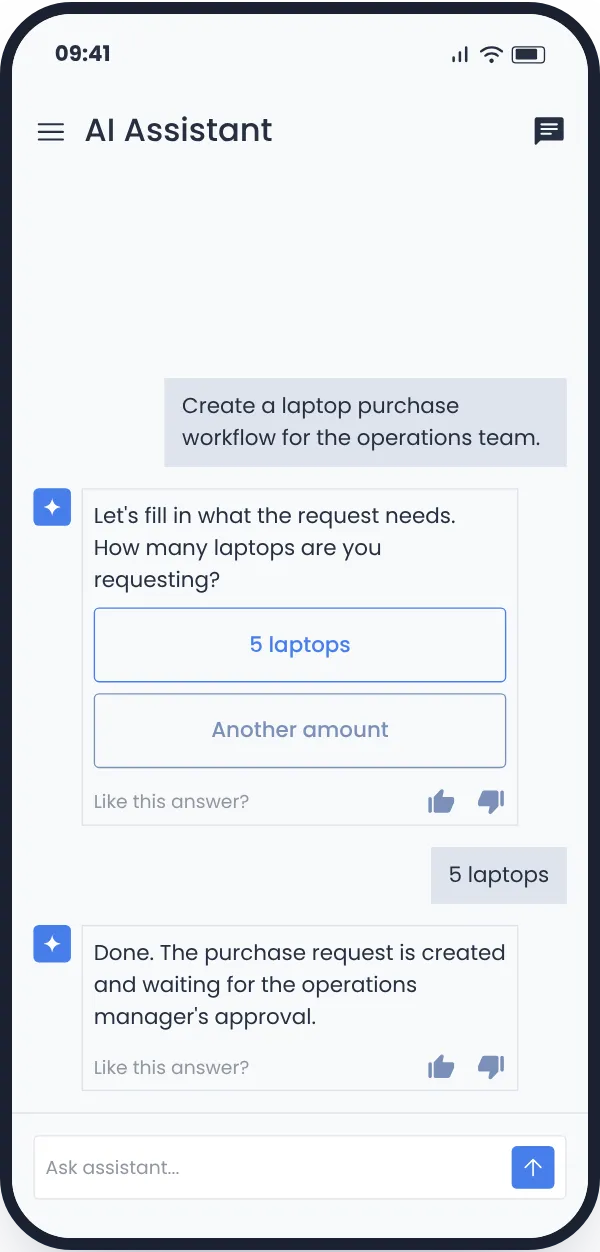

Create and manage workflows
Describe what you need and a workflow is created. Fill in the details in the chat, then follow its status, open steps and records.

Users and organization
Create users and work with users, groups and units through plain-language requests.
Multi-step work
Find records, collect information and carry out the action in one conversation, filling in what's missing along the way.
Work with documents
Find folders and files; summarize or analyze PDFs, images, Word and Excel files in the context of your work.

See where work stands
Check status, delays and notifications, ask follow-up questions and move to the next action in the same chat.
- AskWrite what you want to do, in English or Turkish.
 CompleteThe Assistant finds the process and records and asks for anything missing.
 DoneThe steps run in AnyWork within your permissions and the approval rules.
 FollowSee the new record or the process status and continue in the same chat.
Works within your permissions. The Assistant carries out actions within each user's access rights and the rules of the process. Reading information and taking action rely on the same permission structure.
Smart invoice processing
Upload the invoice. Don't retype it.
Typing invoice details into a form one by one takes time and invites typos. Add the invoice photo or PDF to the AnyWork workflow and company, date, invoice number, tax, total and line items move into their fields. You check, edit and send.
- Photos and PDFs, multi-page PDFs included.
- Invoices in Turkish, German, English and Arabic, among others.
- Seller, buyer, date, invoice and tax number, VAT, discount, currency and total.
- Line items with name, quantity, unit price, VAT, discount and amount.
- A category suggestion: fuel, food, travel, lodging, office, electronics, utilities, groceries and more.
- Everything stays editable; the workflow moves on with your approval.
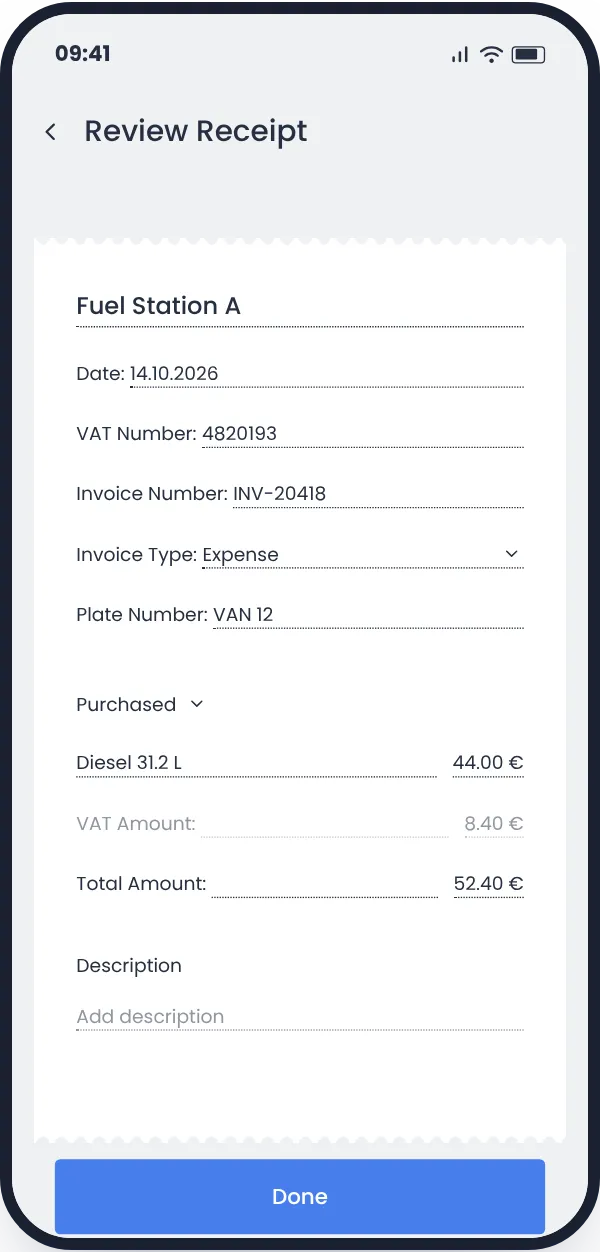
Same workflow, same fields. The details come from the document.
 UploadAdd the invoice photo or PDF to the workflow you already use.
- ReadThe details land in the form fields, with a category suggestion.
- CheckReview the fields, correct anything that needs it and move the workflow on.
Good to know
Questions we hear.
If yours isn't here, ask it in a demo.
Do these solutions do the same thing?
No. DOkuma searches and organizes documents, Code Generator writes code, the Assistant runs processes and creates records in plain language, and invoice processing fills workflow fields.
Is each one a separate app?
Invoice processing runs inside your existing AnyWork workflow. How the others are accessed and set up is covered in the demo.
Which one fits my team?
Tell us what you need and book a demo for that solution.
Which documents can DOkuma read?
PDFs, images, Word, Excel and text files.
What happens to documents it can't read?
Documents that can't be analyzed reliably are flagged for manual review.
Does Code Generator run the code on my database?
No. The code is prepared for you to review. Running it is your decision.
Does it only write code?
No. It also answers questions about your data structures and what they mean for the business.
Can I use it in Turkish?
Yes. Code Generator and the Assistant take questions in Turkish and English.
Can I change the fields read from an invoice?
Yes. Every field can be checked and edited, and the workflow only moves on after you approve.
Let's find the right solution for your team.
Document search, data questions, daily operations or invoices: tell us what you need and we'll look at the right AnyWork solution together.