
INDUSTRIES · Education
Campus operations, from the help desk to the rector's office.
Universities run on approvals: budgets, exams, rooms, IT access and support tickets. AnyWork runs them for staff and students on one platform, with every decision on record.


Ready workflows
Five workflows we already run on campus.
Each one comes with its steps, its owners and its rules. We shape it to your faculties and your approval chain.
Help desk
IT support for staff and students, with L1 and L2 levels.
HD-2418With L2 supportProjector not detected in room B204
- Category
- Classroom IT
- Subcategory
- Display
- Attachments
- 2 files
HD-2418 steps
Create support ticket
Requester
Done- Escalated
L1 support review
L1 Support
Done - In progress
L2 support review
L2 Support
Resolution check
Requester
Not startedTicket closure
System
Not started
A ticket closes only when the requester confirms the fix.
Budget management
Academic and administrative budget requests.
BR-0931Finance DirectorLab equipment renewal, Faculty of Engineering
- Amount
- 184,000 USD
- Priority
- High
- Version
- v2
BR-0931 steps
- v1, v2
Create budget request
Employee
Done - Done
ROI and impact evaluation
Finance Analyst
- Done
Strategic alignment review
Strategy Planning
- Done
Finance validation
Finance Team
- Approved
Department approval
Faculty Management
- Waiting
Finance Director approval
Finance Director
Executive approval
Rectorate
Not startedAllocation and activation
Finance Dept.
Not started
Every revision creates a new version, so earlier figures stay comparable.
IT incident management
Outages handled from first report to permanent fix.
INC-1127Root cause analysisStudent portal login failing
- Priority
- P1
- Impact
- High
- Urgency
- High
INC-1127 steps
Report an incident
IT Staff / L1
Done- Workaround live
Incident investigation
IT Tech Team (L2/L3)
Done - In progress
Root cause analysis
IT Tech Team (L2/L3)
Permanent fix
DevOps / Engineer
Not startedResolution verification
IT Tech Team (L2)
Not startedIncident closed
System
Not started
SLA and every status change are recorded until closure.
IT asset request
Devices requested, tagged and delivered.
AR-0562Awaiting confirmationLaptop for a new research assistant
- Asset
- Laptop
- Spec
- 16 GB, 512 GB
- Target
- 14 Oct
AR-0562 steps
- Sent
Asset request creation
Requester
Done - Approved
IT Manager approval
IT Manager
- Tag IT-7731
Logistics assignment and delivery
IT Logistics
Done - Waiting
Requester confirmation
Requester
Process completion
System
Not started
A wrong or damaged delivery goes back to logistics until it is right.
Room reservation
Classrooms and meeting rooms requested, reviewed and booked.
- Building, room, date, time and attendee count in one request. Room capacity fills in by itself.
- The approver approves, rejects or sends it back with notes on what to change.
- Pending requests for the same room do not block a new one.
A request that overlaps an approved booking cannot be sent or approved.
9:41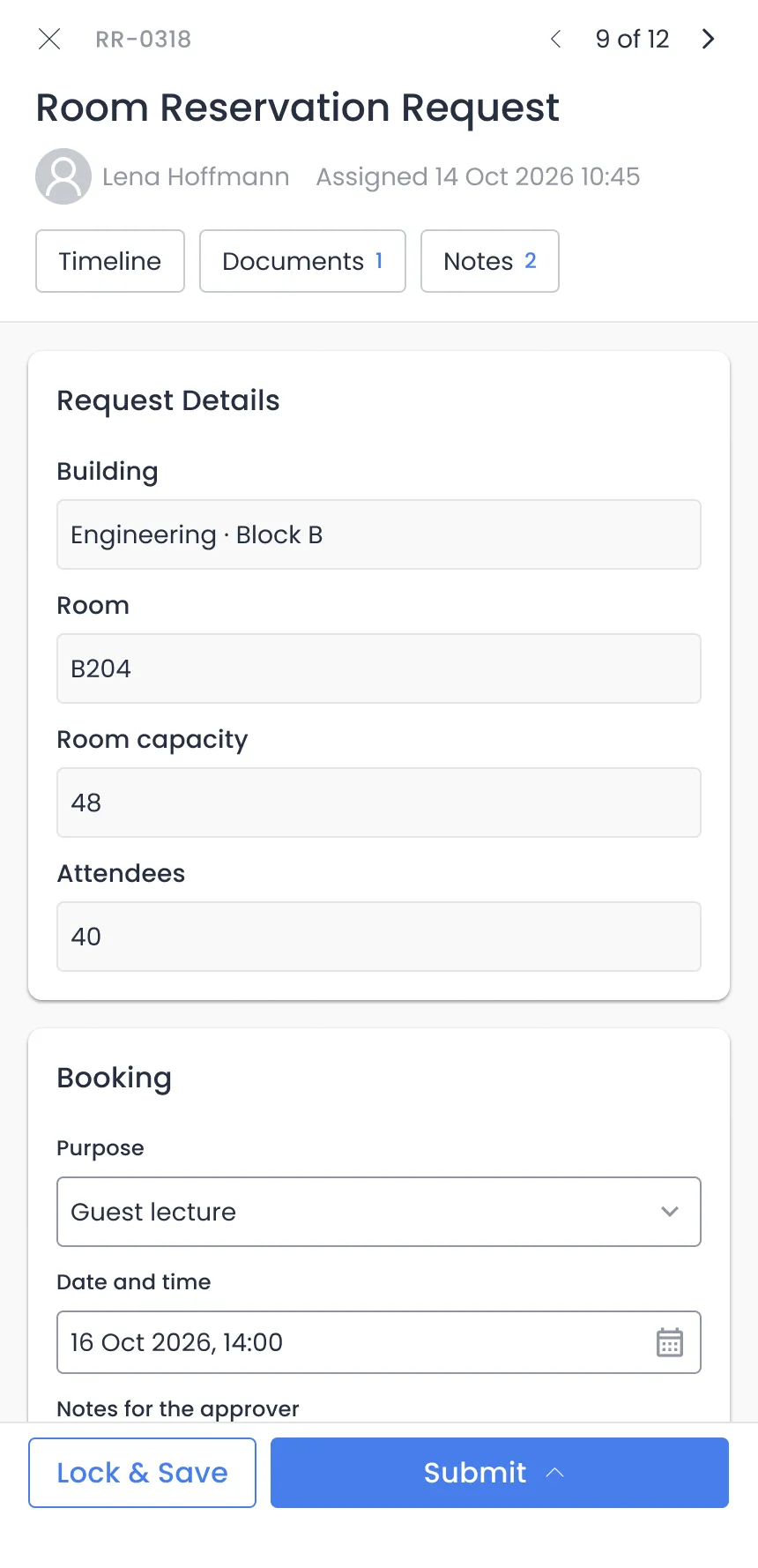 RR-0318Back with approver
Seminar room for a guest lecture
- Room
- B204
- Time
- Thu 14:00
- Attendees
- 40 of 48
RR-0318 steps
- Sent
Reservation request
Requester
Done - Revise
Reservation review
Approver
Done - Resubmitted
Reservation revision
Requester
Done - Availability check
Reservation review
Approver
In progress Process completion
System
Not started
Also on campus
Start from what your teams already do.
Each one is set up to your rules and your words. If yours is not on the list, we add it.
CAMPUS AND IT
2 workflows- Exam schedule approvalDepartments create, review, revise and approve exam schedules.
- IT access requestsStaff and students request the IT access they need and receive it.
FINANCE
3 workflows- Purchase requestsStarts and approves requests to buy goods or services.
- Business advancesRequests an advance payment for business expenses.
- Expense requestsSubmits, reviews and approves employee expense claims.
PEOPLE
5 workflows- Leave requestsStaff apply for leave and track its approval.
- Training requestsStaff request training programs and track them.
- Internal transfersApproves an internal transfer through manager, HR, employee and operations reviews.
- Employee onboardingSets up a new hire's accounts and resources.
- Annual performance reviewsThe yearly cycle of evaluating employee performance.
Not on the list? Tell us yours and we set it up.
On record
Every decision, traceable.
Audits stop being a search through inboxes. The record is already there.
Full audit trail
Every approval, rejection and revision is saved with the user, the reason and a timestamp.
Confirmation loops
Support cannot close a ticket alone, and a delivery waits for the requester to confirm it.
Versioned budgets
Each revision is a new version, and planned savings are compared with what actually happened.
Modules
The modules campuses take first.
Every module writes to the same records. Add the next one when you need it.
 Help desk
 Inventory
 Documents
 Attendance
 Finance
 Reporting
Name your next campus process.
Bring the one that costs your staff the most time. We map it with you and show it running in the demo.